
Cricbet99 Registration – How to Create Your Account
Creating a Cricbet99 account takes about 2 minutes(Cricbet99 Signup). All you need is an Indian mobile number that can receive an OTP and a password you will remember. You can sign up yourself on the official registration page, or skip the form and get a ready-made ID on WhatsApp. Cricbet99 covers both ways, what you need before you start, how the ₹100 activation works and how to log in for the first time.
Cricbet99 Registration Steps
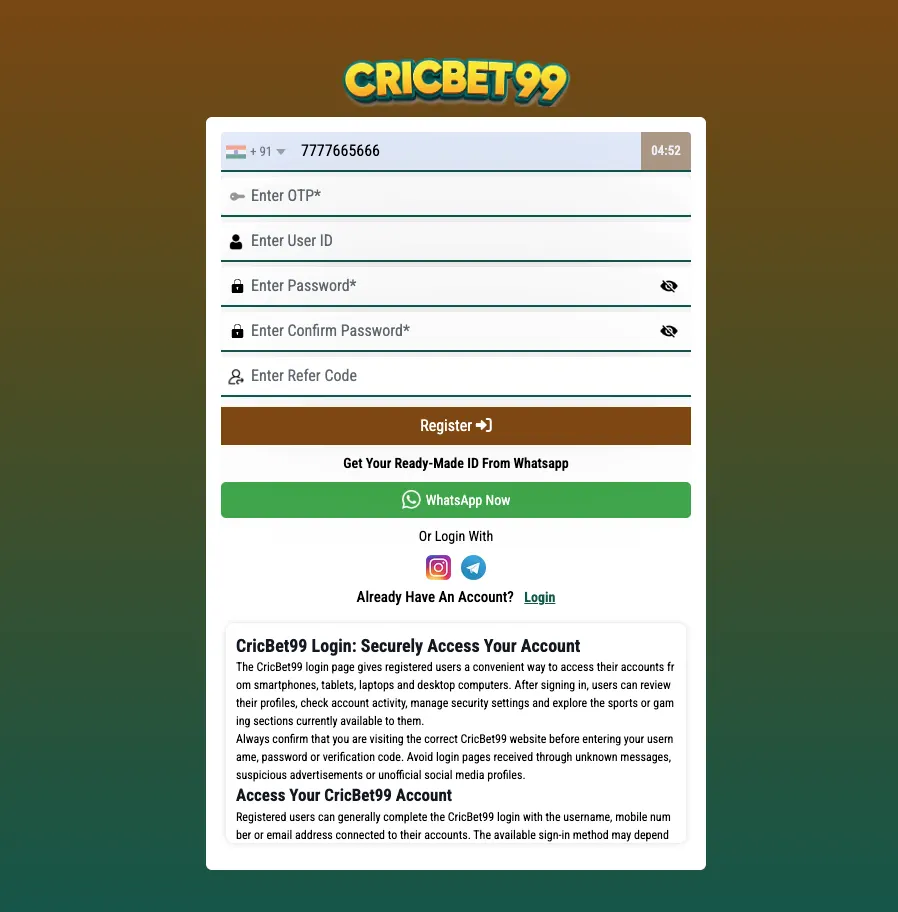
The sign-up form on the official registration page is short. Here is exactly what you will see and fill in.
Step 1: Enter your mobile number and get the OTP
Open the official sign-up page. The country code is already set to +91. Type your 10-digit number in the Enter Mobile Number field and tap GET OTP. Enter the code you receive by SMS to verify the number.
Step 2: Choose a User ID (optional)
Want a username of your own? Tap Want to set UserID? under the number field and type it in the Enter User ID box. If you skip this, you can still log in with your mobile number.
Step 3: Create your password
Type a password in Enter Password and type it again in Enter Confirm Password. Both must match. Tap the eye icon to check what you typed.
Step 4: Add a referral code (optional)
If a friend gave you a code, tap Have a referral code? and paste it in the Enter Refer Code field. If you do not have one, leave it empty.
Step 5: Tap Register
Press the Register button. Your account is created and you can move on to activation and your first login.
| Field | Required? | What to enter |
|---|---|---|
| Enter Mobile Number (+91) | Yes | Your 10-digit Indian mobile number, verified with GET OTP |
| Enter User ID | Optional | A username of your choice (opens via “Want to set UserID?”) |
| Enter Password | Yes | A strong password |
| Enter Confirm Password | Yes | The same password again |
| Enter Refer Code | Optional | A referral code, if you have one (opens via “Have a referral code?”) |
Register via WhatsApp Instead
Do not want to fill a form? The sign-up page also has a Get Your Ready-Made ID From WhatsApp option. Tap WhatsApp Now and the support team sets up your account for you.
- Tap WhatsApp Now on the sign-up page, or use the button on our Cricbet99 ID page.
- Send a message asking for a new ID.
- Follow the steps support shares to activate the account.
- You receive a User ID and password. Use them on the User ID tab of the Cricbet99 login page.
This is a good option if the OTP is not arriving or you want help with your first deposit. Change the password after your first login and do not share it with anyone.
What You Need to Sign Up
- A working Indian mobile number: it must receive SMS for the OTP. Each number can be linked to only one account.
- Age 18 or above: Cricbet99 is only for adults. Do not register if you are under 18.
- A password: at least 8 characters with letters and numbers, not reused from another site.
- KYC documents later: you do not need documents to register. You may be asked to verify your identity before a withdrawal, so keep a valid ID proof and the bank or UPI details in your own name ready.
Check local rules: make sure online betting is allowed where you live before you create an account.
Activate Your Account With ₹100
Your Cricbet99 ID becomes active once you make your first deposit. You can start with as little as ₹100, so you do not need a big amount to try real-money play.
- Log in and open the deposit section, or ask WhatsApp support for the payment details.
- Add ₹100 or more using one of the listed payment options.
- Share the payment proof if support asks for it.
- Once the amount shows in your balance, your account is ready to play.
Full payment steps are on our add money to Cricbet99 guide. Only pay to the details shown in your account or sent by official support, never to numbers shared by strangers.
Not ready to deposit? Try the platform first with a Cricbet99 Demo ID.
First Login After Registration
- Open the Cricbet99 login page.
- Use the Mobile Number tab with the number you registered, or the User ID tab if you set a User ID or got one on WhatsApp.
- Enter your password and tap Login.
- Check your balance, then bookmark the login page so you do not have to search for it next time.
On Android you can also install the app with the Download APK button on the login page and sign in with the same details.
Registration Problems and Fixes
OTP not received
- Check the number for typing mistakes and confirm the +91 code is selected.
- Wait a minute before tapping GET OTP again. Several quick requests can delay the SMS.
- Check your signal and make sure SMS from unknown senders is not blocked.
- Still nothing? Get your account through WhatsApp Now instead.
Mobile number already used
- The number already has an account. Go to the login page and sign in instead.
- If you forgot the password, use Forgot Password? on the login page.
- If you never registered this number, contact WhatsApp support from that number.
Passwords do not match
- Retype both password fields and use the eye icon to compare them.
User ID not accepted
- The User ID may already be taken. Try a different one or leave the field empty and log in with your mobile number.
Register button not working
- Make sure the OTP is verified and every required field is filled.
- Refresh the page, clear your browser cache or try another browser.
Cricbet99 Account Kaise Banaye
Cricbet99 par account banana bahut aasaan hai. Yeh steps follow karein:
- Official Cricbet99 sign-up page kholein.
- Enter Mobile Number mein apna 10-digit number daalein aur GET OTP dabayein. SMS mein aaya OTP daalein.
- Apna username chahiye to Want to set UserID? par click karein.
- Password daalein aur Confirm Password mein dobara wahi password likhein.
- Referral code hai to Have a referral code? par click karke daalein.
- Register button dabayein. Aapka account ban jayega.
Form nahi bharna? WhatsApp Now par click karke ready-made ID lein. Account sirf ₹100 deposit se activate ho jata hai. Yaad rakhein, Cricbet99 sirf 18 saal se upar ke logon ke liye hai.
Also Searched As
Players look for this guide using different search terms. They all lead to the same official sign-up:
- cricbet99 registration
- cricbet99 sign up
- how to create cricbet99 account
- how to create id on cricbet99
Play responsibly: set a budget before you play, take breaks and never chase losses. Read our Responsible Gaming page for tips and limits.
Cricbet99 Signup FAQs
How do I register on Cricbet99?
Open the official sign-up page, enter your mobile number and verify it with GET OTP, set a password, confirm it and tap Register. You can also get a ready-made ID through WhatsApp Now.
Is Cricbet99 registration free?
Yes. Creating the account is free. To activate it for real-money play, you make a first deposit, which can start from ₹100.
Can I choose my own User ID?
Yes. Tap Want to set UserID? on the sign-up form and enter the username you want. If you skip it, you can log in with your mobile number.
Do I need KYC documents to sign up?
No documents are needed to register. You may be asked to verify your identity before a withdrawal, so keep a valid ID proof and bank or UPI details in your own name ready.
What if I do not receive the OTP?
Check the number and the +91 code, wait a minute and tap GET OTP again. If it still does not arrive, use WhatsApp Now to get your ID from support.
Can I create two accounts with one mobile number?
No. Each mobile number can be linked to one account. If the number is already registered, log in or reset your password instead.