
Cricbet99 Login
Cricbet99 login takes less than a minute once you have your ID. You can sign in with your Mobile Number or your User ID, on a phone or a desktop, and if anything goes wrong, the support team on WhatsApp can help you get back in. Cricbet99 team walks through every step on the official login page, explains which link to use, and covers the most common login problems with quick fixes.
Cricbet99 Login in 3 Steps
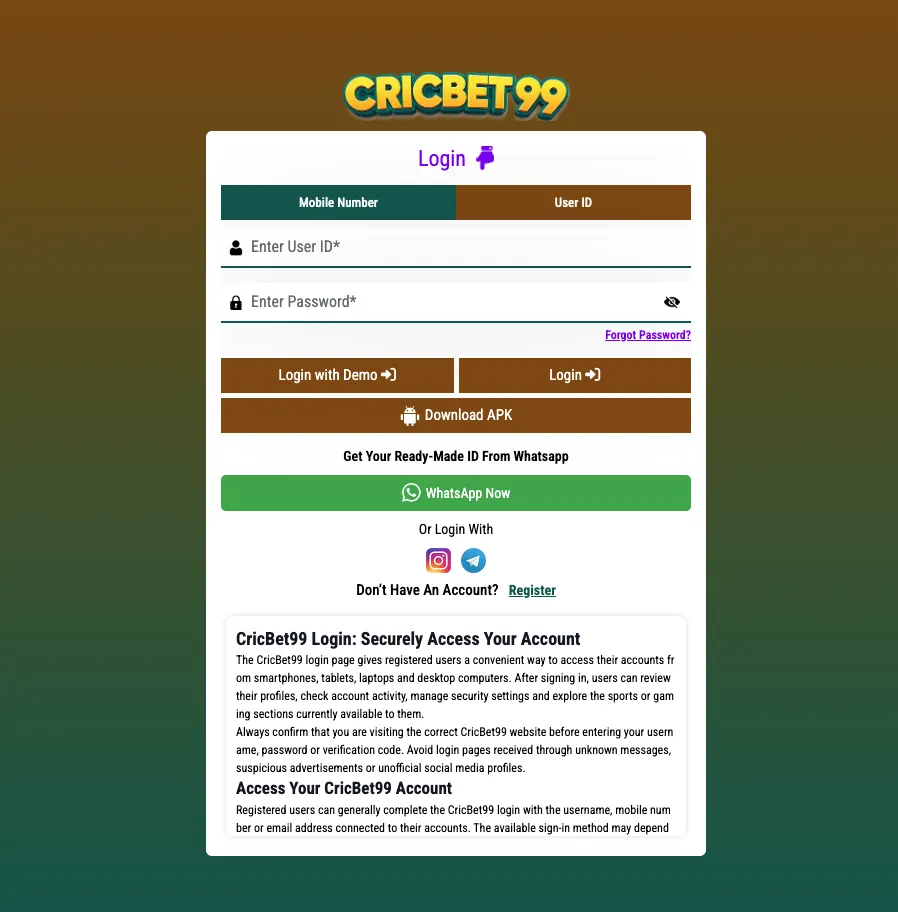
Open the official Cricbet99 link and go to the login page. The login box has two tabs at the top: Mobile Number and User ID. Pick the one that matches how your account was created.
Step 1: Open the login page and choose a tab
Go to the official login page and select either the Mobile Number tab or the User ID tab.
- Mobile Number: use this if you registered with your phone number. The country code is set to +91 for India.
- User ID: use this if you received a ready-made ID (for example, through WhatsApp).
Step 2: Enter your details
- On the Mobile Number tab: type your number in the Enter Mobile Number field, then choose Password or OTP. With Password, enter it in the Enter Password field. With OTP, request the code and enter it when it arrives on your phone.
- On the User ID tab: type your ID in the Enter User ID field and your password in the Enter Password field.
Tap the eye icon next to the password field to show what you typed. This helps you catch typing mistakes before you sign in.
Step 3: Tap Login
Press the Login button. Your dashboard opens and you can check your balance, deposit, withdraw and start playing. If the page shows an error, jump to Cricbet99 Login Problems and Fixes below.
Tip: Save your User ID and password in a secure password manager, not in a screenshot in your gallery. Never share your password or OTP with anyone, including people who say they are from support.
Cricbet99.com Login vs Official Link
Many players search for “cricbet99.com login” and land on a page that only looks like Cricbet99. Copycat sites use the same logo and colours to collect IDs and passwords. Before you type anything, check the address bar.
| What to check | What it should look like |
|---|---|
| Login page address | The current official login page is cricbet99.gold/login. See the official Cricbet99 link page for the latest working address. |
| Secure connection | The address starts with https:// and your browser shows the padlock icon. |
| Login options | Mobile Number and User ID tabs, Login with Demo, Forgot Password and Register links. |
| Where the link came from | Our site, a saved bookmark or official WhatsApp support. Avoid links forwarded by strangers or found in random social media comments. |
Betting site addresses can change from time to time. Bookmark the login page after your first visit, and if the link stops working, ask WhatsApp support for the current one instead of searching for it again.
Cricbet99 Login on Mobile
The login page works in any mobile browser, so you do not need to install anything to sign in. You have two options:
Option 1: Mobile browser (Android and iPhone)
- Open Chrome or Safari and go to the official login page.
- Choose the Mobile Number or User ID tab and enter your details.
- Tap Login.
- To reach it faster next time, use “Add to Home Screen” from the browser menu. It works like an app icon.
Option 2: Cricbet99 APK (Android)
- On the login page, tap Download APK.
- If your phone asks, allow installs from your browser for this file only.
- Install and open the app, then sign in with the same Mobile Number or User ID and password.
Only download the APK from the button on the official login page. APK files shared in groups or on unknown websites can be modified.
Login With Demo ID
Want to look around before creating an account? The login page has a Login with Demo button next to the main Login button. Tap it to open a demo account and explore the dashboard, markets and casino games without using real money.
- No ID or password is needed for the demo.
- Demo balance is for practice only. It cannot be deposited or withdrawn.
- When you are ready to play for real, register or get your Cricbet99 ID.
Read more on the Cricbet99 Demo ID page.
Forgot Password: How to Reset
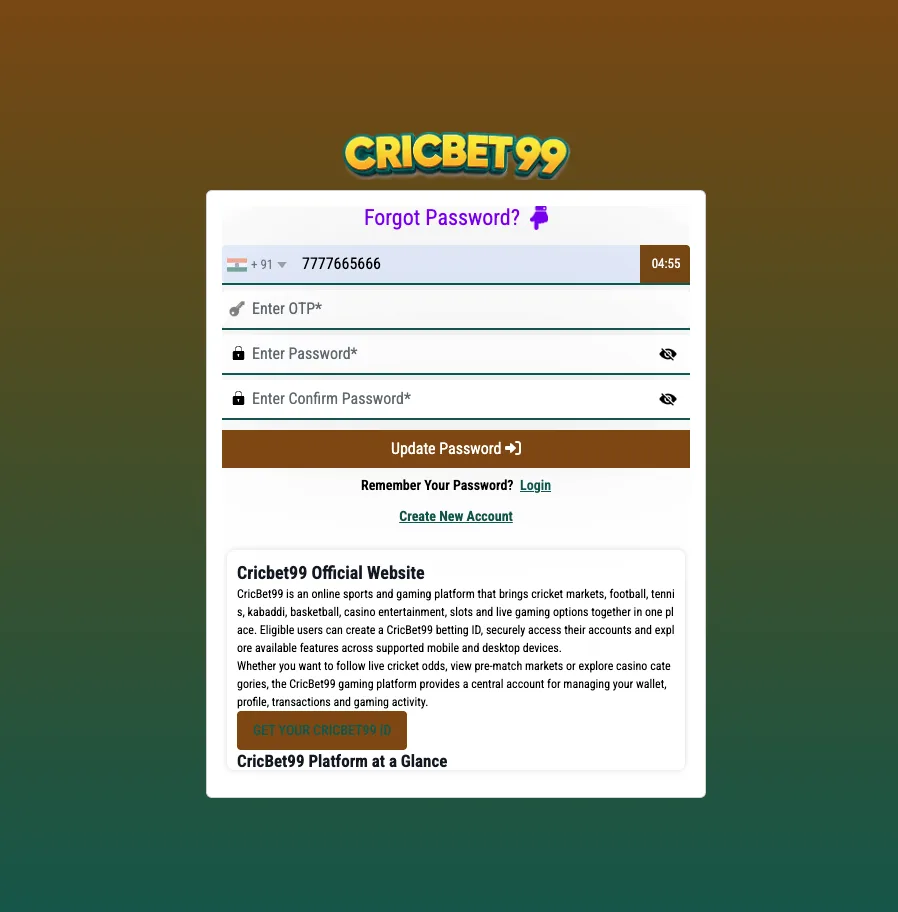
If you cannot remember your password, you can reset it from the login page.
- Open the official login page.
- Tap Forgot Password? below the password field.
- Enter the details the page asks for, usually your registered mobile number, and follow the on-screen steps to verify it.
- Set a new password and sign in with it.
If your ID was created through WhatsApp and you do not have a registered mobile number on the account, message WhatsApp support from the number you used to get the ID. They can help you reset it.
Choosing a strong password: use at least 8 characters with a mix of letters and numbers, and do not reuse a password from another site.
Cricbet99 Login Problems and Fixes
Most login issues come from a small set of causes. Find yours below. For a longer troubleshooting list, read our blog post Cricbet99 Login Problems and Fixes.
Wrong password or “invalid credentials”
- Make sure you are on the right tab. A User ID will not work in the Mobile Number tab, and a mobile number will not work in the User ID tab.
- Tap the eye icon to check what you typed. Look for extra spaces and Caps Lock.
- User IDs can be case-sensitive. Type it exactly as you received it.
- Still failing? Use Forgot Password? to set a new one.
Account locked or blocked
- Too many wrong attempts can lock the account for a while. Stop trying and wait before signing in again.
- If it stays locked, contact WhatsApp support with your User ID. Do not send your password.
Login page not loading
- Check your internet, then switch between Wi-Fi and mobile data.
- Clear your browser cache or open the page in a private/incognito tab.
- Update your browser or the APK to the latest version.
- The address may have changed. Get the latest one from the official Cricbet99 link page.
OTP not received
- Check that the number is correct and the +91 code is selected.
- Wait a minute before requesting a new OTP, and check your signal.
- Switch to the Password option if you have already set a password.
Cricbet99 Login Kaise Kare
Cricbet99 login karna bahut aasaan hai. Bas yeh steps follow karein:
- Official Cricbet99 login page kholein.
- Upar Mobile Number ya User ID tab chunein.
- Mobile Number tab mein apna number daalein aur Password ya OTP chunein. User ID tab mein apna User ID aur Password daalein.
- Login button dabayein. Aapka account khul jayega.
Password bhool gaye? Forgot Password? par click karke naya password set karein. Abhi account nahi hai? Register karein ya WhatsApp se apni ready-made ID lein. Koi bhi problem ho to WhatsApp support se baat karein.
Do Not Have an Account? Register or Get Your ID
You need an account before you can log in. There are two ways to get one:
- Register online: tap Register at the bottom of the login box and sign up with your mobile number. Full steps are on the Cricbet99 Register page.
- Get a ready-made ID on WhatsApp: tap WhatsApp Now on the login page, or follow the Cricbet99 ID guide. Support sends you a User ID and password that you can use on the User ID tab right away.
Play responsibly: Cricbet99 is for users aged 18 and above. Set a budget before you play, never bet money you cannot afford to lose, and check that online betting is allowed where you live.
Also Searched As
Players look for this page using different search terms. They all lead to the same official login:
- cricbet99 login
- cricbet99.com login
- cricbet99 how to login
- cricket99 login
- cricbet99 green login
Cricbet99 Login FAQs
How do I log in to Cricbet99?
Open the official login page, choose the Mobile Number or User ID tab, enter your details and password (or OTP on the Mobile Number tab), then tap Login.
What is the official Cricbet99 login link?
The current official login page is cricbet99.gold/login. Addresses can change, so check our official Cricbet99 link page or ask WhatsApp support for the latest one.
Can I log in to Cricbet99 with OTP?
Yes. On the Mobile Number tab, choose the OTP option, request the code and enter it to sign in without a password.
Can I try Cricbet99 without an account?
Yes. Tap Login with Demo on the login page to explore the platform with a practice balance. Demo funds cannot be withdrawn.
What should I do if I forgot my Cricbet99 password?
Tap Forgot Password? on the login page and follow the steps to set a new one. If your ID came from WhatsApp, contact WhatsApp support from the same number for help.
Why is my Cricbet99 login not working?
The usual causes are using the wrong tab, a typing mistake in the password, too many failed attempts, or an old link. Check the tab and password, clear your browser cache, use the latest official link, or contact WhatsApp support.